The Dual Camera Effect: How to Film Front and Back at the Same Time
You've seen it a hundred times without knowing the name: a video where the main shot fills the screen and the creator's face sits in a small box in the corner, reacting in real time. That's the dual camera effect, the front and back cameras recording at the same time, your face and what you're filming in one frame. It's the look behind most reaction videos, a lot of vlogs, and nearly every "watch this with me" clip on your feed.
This guide covers iPhone and Android: the free built-in options, where they stop, and how to make the result look good instead of cramped.
How do you use the front and back camera at the same time?
Switch on a dual camera mode before you press record. Your phone then runs both cameras together and records your face and the scene on the same timeline. Which mode you use depends on the phone:
- iPhone 17, iPhone Air or iPhone 18 Pro: Dual Capture, built into Apple's Camera app. Steps are below.
- Older iPhones: Snapchat's Dual Camera, Instagram's Dual, or a third-party camera app. Apps have been allowed to run the front and back cameras together since iOS 13.
- Android: a camera app with a front and back mode, on phones whose hardware can run two cameras at once. Instagram's Dual is worth checking too.
Every built-in option gives you one finished video with the layout baked in. A dedicated app can save the two cameras as separate files instead. That difference decides which one you want, and it is covered further down.
How do you get the dual camera effect for free?
For a lot of people the answer is that you already have it. These routes are free and need no extra download:
- iPhone Camera app. Apple's Dual Capture records you and the action in front of you at the same time. The iPhone 17 specs page lists it at up to 4K Dolby Vision at 30 fps, and Apple's guide shows the front camera as a window in the top-left of the rear shot.
- Instagram. Meta's announcement of the Dual feature says it lets you "record using your phone's front and back cameras simultaneously" from the Instagram camera, so you can record content and your reaction at the same time.
- Snapchat. Dual Camera is an icon in the Camera toolbar. Tap it, try the layouts, and take a Snap. Snapchat's help centre lists it for iPhone XS, XS Max, XR or later.
- TikTok. I couldn't confirm a dual camera feature on TikTok's own help pages when I checked on 4 October 2026, so I'm not pointing you to one. Recording with Dual Capture or a camera app and uploading the file to TikTok gets you the same look.
If one of those covers what you need, use it. There is no reason to install anything.
How do you record front and back camera at the same time on iPhone?
On a supported iPhone, Dual Capture in the Camera app is the quickest way. Apple's iPhone User Guide gives these steps:
- Open Camera and select Video mode.
- Tap the Camera Controls button, then tap Dual Capture.
- Tap the screen to show the Record button, then tap Record.
- To turn it off, tap the Dual Capture button.
Apple lists six models that support it: iPhone 17, iPhone 17 Pro, iPhone 17 Pro Max, iPhone Air, iPhone 18 Pro and iPhone 18 Pro Max. On an older iPhone, use Snapchat, Instagram or a third-party app instead. For the model-by-model detail, the iOS versions and the resolution limits, see which iPhones can record front and back at once, and their limits. For what Dual Capture can't do with the file afterwards, see iPhone 17 Dual Capture and where it stops.
How do you use both cameras at the same time on Android?
Use a camera app with a front and back mode, and check Instagram's Dual in the Instagram camera. Meta's announcement describes Dual as using "your phone's front and back cameras" without limiting it to iPhone. Whether any of it works comes down to your phone's hardware.
- The Android side of it. Android 11 (API level 30) added
getConcurrentCameraIds(), which tells an app which cameras on the phone can run at the same time. If a phone reports no front and rear pair there, apps using that official route cannot record both cameras on it. - Snapchat is not there yet. Snapchat's help centre says Dual Camera "will be available on Android soon", so for now it is an iPhone feature.
- Apple's Dual Capture is iPhone only, for obvious reasons.
ContentCam's Front & Back mode runs on Android as well as iPhone, and the app only offers what your phone's camera actually supports.
Why is the Instagram dual camera not showing?
The usual causes are an out-of-date Instagram app, the wrong part of the Instagram camera, or a phone that can't run its front and back cameras together. Meta announced Dual in July 2022 as a Reels tool that lets you "record using your phone's front and back cameras simultaneously" in the Instagram camera. I couldn't confirm where Instagram puts Dual today: Instagram's help pages didn't confirm it when I checked on 4 October 2026. So the checks below are general ones and don't name an exact icon or menu.
- Update Instagram from the App Store or Google Play, then close and reopen the app.
- Start in the Reels camera. Meta launched Dual with the Reels creation tools, so look there first, then try the Stories camera.
- Check that the phone can run two cameras at once. Not every phone can. On iPhone, apps ask Apple's
AVCaptureMultiCamSessionwhether the device supports multi-camera sessions. On Android 11 and later,getConcurrentCameraIds()lists which cameras can run together. If a phone reports no front and back pair, an app can't offer a dual mode on it.
If Dual still doesn't show up, record the clip outside Instagram and upload it as a Reel. On an iPhone 17, iPhone Air or iPhone 18 Pro model, use Dual Capture in the Camera app. On other phones, use a camera app with a front and back mode (see the Android section and the dual-camera apps compared).
How do you take a selfie and a back camera photo at the same time?
Use Snapchat's Dual Camera, which takes a Snap with both cameras in one frame. Apple's Dual Capture and Instagram's Dual are video features, so with those the workaround is to record a couple of seconds and save a still from the clip. Either way you get one image with the layout fixed, so put the selfie corner somewhere it won't cover the shot. For two separate photos instead, see how to take a photo with the front and back camera at the same time.
Where do the free versions stop?
They stop at ownership and control, and the limits are the same across all of them.
- You get one baked file. The layout is burned in, so you cannot move the small frame later, resize it, or pull the two angles apart in an edit.
- The layout is fixed at capture. Whatever you chose while filming is what you keep.
- The in-app versions keep you in the app. Filming in Instagram or Snapchat gives you a post in that app, not a clean file you can also put on YouTube.
- You get one aspect ratio. This is the one that catches people out, and it is covered further down.
None of that matters for a quick reaction clip. It matters a lot if the footage has to survive an edit, or go to more than one platform.
What is the dual camera effect?
The dual camera effect, often shortened to dual cam, is a video where the front and back cameras record at once and end up in one frame. Your phone has at least two cameras: the rear one you point at the world, and the front selfie one that sees you. Normally you use one at a time. The effect usually puts your face in a small inset (picture-in-picture) over the main rear-camera shot. Some apps also offer a top and bottom split screen.
It took off because it makes reactions honest. When your face and the thing you're reacting to are recorded on the same timeline, the timing is real. Film the reaction separately afterwards and viewers feel the fake, even if they can't say why.
What is the dual camera effect good for?
- Reactions. Your face over the clip, trailer, message or product you're reacting to.
- Vlogs and POV. Show the walk, the meal, the view, with you in the corner narrating it as it happens.
- Unboxings and demos. Your hands on the thing from the rear camera, your face reacting from the front, in one take.
- Tutorials. Point the rear camera at what you're doing while your face explains it.
Should you use a built-in mode or a dedicated app?
Use the built-in mode when the clip you record is the clip you post. Use a dedicated app when you want to edit the two angles.
- Built-in modes (Dual Capture, Instagram, Snapchat) hand you one finished video with that app's framing and, usually, only its own aspect ratio.
- A dedicated app can keep the two angles as separate files, so inset size, position and layout are decisions you make in the edit rather than at capture.
Doing it in ContentCam
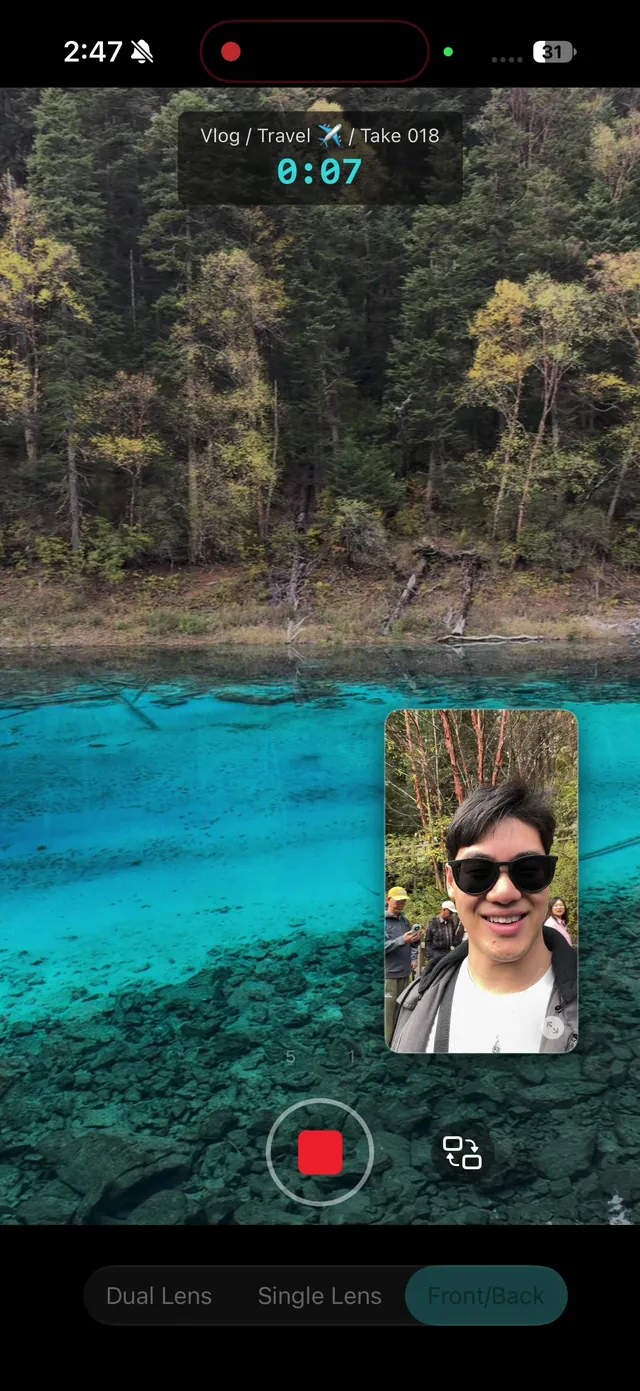
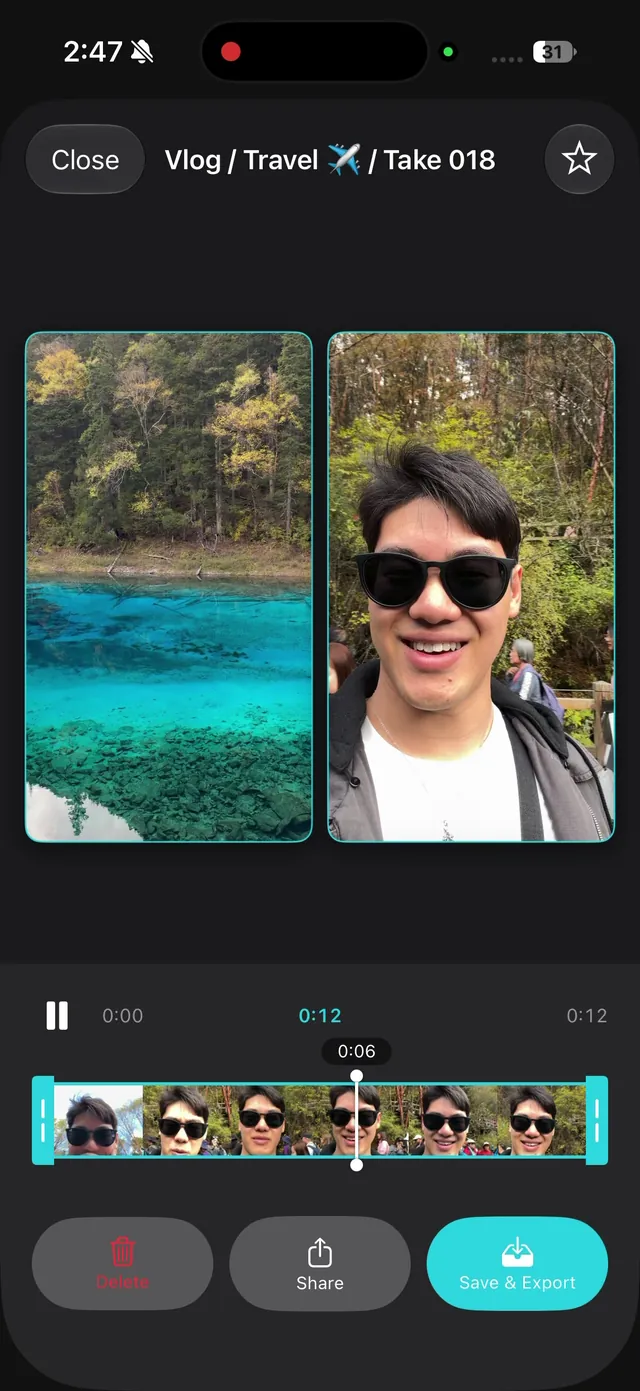
ContentCam has a Front / Back mode: open the app, switch to front and back, record once, and your rear camera and selfie camera come out of the same take as two separate files, so you place the inset yourself in the edit. It's on iPhone and Android, and there's no watermark on anything it produces.
Can you get the dual camera effect in portrait and landscape?
Not from one capture with the built-in modes, because each records a single aspect ratio. The reaction look is great for TikTok, Reels and Shorts, which are all vertical (9:16). If you also want the clip on YouTube, you need a wide (16:9) version, and re-filming a reaction to get it defeats the point, because the reaction won't be the same.
This is the problem ContentCam was built around. Separately from Front & Back, its core mode records a scene as a vertical file and a wide file at the same time, from one take, so you can shoot for TikTok and YouTube without reshooting.
How do you make a dual camera video look good?
Choose the mode before you record, then light your face and frame around the inset. The front camera is the weaker sensor and the audio is easy to get wrong, so a few habits do most of the work:
- Light your face. Face a window or a lamp. The selfie camera gets grainy in dim rooms faster than the rear one, and your face is the part people watch.
- Give the inset a home. Frame the rear shot with one corner already spoken for, so your face doesn't cover the thing you're showing. On Dual Capture, Apple's illustration puts the front camera window in the top-left.
- Talk toward the phone. Phone mics favour whoever's closest and loudest. If you step back to show something, your voice drops, so keep it up, or come closer for the lines that matter.
- Lock exposure if you move. Walking from a bright window into a dark hallway makes both cameras hunt and pump. Locking it holds the look steady, and ContentCam's manual controls do this.
- Shoot for the platform up front. Vertical for TikTok, Reels and Shorts. If you want YouTube too, capture the wide version in the same take rather than cropping later.
Common questions
How do you film the front and back camera at the same time? Turn on a dual camera mode before you press record. On an iPhone 17, iPhone Air or iPhone 18 Pro model that is Dual Capture in the Camera app. On other phones it is Instagram's Dual feature, Snapchat's Dual Camera on iPhone, or a third-party camera app with a front and back mode.
How do you get dual camera on your phone? You probably already have it. Check the Camera app first if you have an iPhone 17, iPhone Air or iPhone 18 Pro model, then the Dual option in the Instagram camera. If neither shows up, a camera app with a front and back mode adds it, as long as the phone can run two cameras at once.
How do you make a dual camera video? Pick the mode before you record: Dual Capture on a supported iPhone, Dual in the Instagram camera, Dual Camera in Snapchat on iPhone, or a front and back camera app. Frame the main shot with one corner kept clear for your face, light your face, then record once so the reaction and the scene share a timeline.
Is the dual camera effect free? Yes. Instagram's Dual, Snapchat's Dual Camera and the iPhone's Dual Capture are all free. You only need a separate app when you want the two angles as usable footage rather than a finished post.
Do I need an iPhone 17 to use both cameras at once? No. Dual Capture in the stock Camera app needs an iPhone 17 model, iPhone Air or iPhone 18 Pro model. Snapchat's Dual Camera works from iPhone XS and XR, and third-party apps have been able to run the front and back cameras together since iOS 13.
Does the dual camera effect work on Android? On phones whose hardware supports it, yes. Android 11 added an official way for apps to run two cameras at once, and each phone reports which cameras it can run together. Apple's Dual Capture is iPhone only, and Snapchat's help centre still lists Dual Camera as coming to Android.
Why is the Instagram dual camera not showing? Usually the Instagram app is out of date, you are in the wrong part of the Instagram camera, or the phone can't run its front and back cameras together. Update Instagram, look for Dual in the Reels camera first and then the Stories camera, and check that the phone supports two cameras at once (Apple's AVCaptureMultiCamSession on iPhone, getConcurrentCameraIds() on Android 11 and later). If Dual still doesn't show up, record with Dual Capture on an iPhone 17, iPhone Air or iPhone 18 Pro model, or with a front and back camera app, and upload the clip.
Can I move the small frame afterwards? Not with the free options. They record one file with the layout baked in. To change the layout in the edit you need the two cameras saved as two separate files.
Why does my dual camera video only work on one platform? Because it was captured in one aspect ratio. A vertical capture cropped to widescreen keeps only about a third of the frame, which is why the same clip rarely works on both TikTok and YouTube.
Sources, checked 4 October 2026: Apple's Record a video with your iPhone camera and Models that support Dual Capture video, the iPhone 17 specs page, Apple's AVCaptureMultiCamSession documentation, Snapchat's What is Dual Camera on Snapchat and Who is Dual Camera available for, Meta's Reels announcement, and Android's CameraManager reference.
Try ContentCam free, vertical and wide from a single shoot, plus Front & Back for the two-camera look. Every take is two clean files. No watermark, iPhone and Android.


Related: filming a reaction video on your phone · iPhone models, iOS versions and limits for front and back recording, the best front-and-back and dual-camera apps compared, and the difference between front/back and dual-lens recording. Also: iPhone 17 Dual Capture, and where it stops.