Best Front-and-Back & Dual-Camera Apps (2026): An Honest Guide
Disclosure: I build ContentCam, one of the apps below, so I'm not neutral. I've kept every claim about the other apps to what their current App Store listings say, checked 21 August 2026, and I've said plainly where each one beats mine. Prices and features drift; if something's out of date, email me and I'll fix it.
"Dual camera" gets searched for two completely different things, and picking the wrong app comes from not knowing which one you actually want. So before any comparison, the fork in the road:
Two different things people call "dual camera"
- Front + back at the same time (the "dual camera effect"). One video that shows you and what you're looking at together, your face in a small inset over the main shot. This is the reaction / vlog / POV look. Apps built for this: MixCam, Dualgram, DoubleTake.
- One take, two formats (dual-format). You film a scene once and walk away with a separate 9:16 vertical file and a separate 16:9 wide file, so you can post to TikTok/Reels/Shorts and YouTube without reshooting. Apps built for this: DualShot Recorder and ContentCam.
They solve unrelated problems. A front-and-back app won't give you a clean widescreen file for YouTube; a dual-format app isn't primarily about putting your face in the corner. The catch most people miss: ContentCam does both, which is the reason this whole post exists. More on that below. First, the honest breakdown.
The front-and-back apps (the "dual camera effect")
| App | Platform | What it captures | Notes (from current listing) |
|---|---|---|---|
| MixCam (Mixcord) | iPhone only | Front + back into one video (PiP, split, crossover) | The most-rated of the group. Action-mode stabilisation, Center Stage, group-photo mode. Subscription. |
| Dualgram (Just2us) | iPhone / iPad | Front + back; saves the composite and both original files | PiP + split-screen 1:1 / 1:2, up to 4K60, has a teleprompter. Photo + video. Subscription. |
| DoubleTake (Bending Spoons, ex-Filmic) | iPhone / iPad only | Two cameras at once, PiP or shot/reverse-shot | The old pro pick. Free, but last updated March 2025 and limited to older-hardware multicam. Lowest rating of the group. |
| ContentCam | iPhone + Android | Front + back (Front / Back mode), plus everything in the next table | Front/Back is one mode among several. No watermark, no data collection. |
If all you want is your face over your POV for reactions and vlogs, MixCam and Dualgram are both mature, well-rated, iOS-only apps. They do that one job well. DoubleTake is free and capable but has gone quiet (no update since early 2025), so I'd check it still does what you need before relying on it.
The dual-format apps (one take, both aspect ratios)
| ContentCam | DualShot Recorder | |
|---|---|---|
| Platforms | iPhone + Android | iPhone only |
| 9:16 + 16:9 as two files, one take | Yes | Yes |
| Full-sensor 4:3 capture (not a centre crop) | Yes, full field of view both ways | Not stated |
| Dual Lens (two rear cameras, two framings at once) | Yes, iPhone 11+ | No |
| Front / Back mode (the dual camera effect) | Yes | No |
| Manual controls | Exposure, white balance (2500-8000K), ISO, shutter | ISO (manual ISO only, per its listing) |
| Teleprompter | Yes (iPhone + Android) | No |
| Project / scene / take workflow | Yes, auto file naming | No |
| Watermark | Never, any tier | Check listing |
| Data collection | None. No analytics, SDKs or account | See its App Store privacy label |
| One-off / lifetime option | Yes | Subscription |
DualShot Recorder is the other serious dual-format app, and its real edge is name recognition. It's the one most creators have already heard of, in large part because its creator had a sizeable audience. If you're iPhone-only and want the best-known option, it's a fair pick. I'd rather tell you that than pretend otherwise.
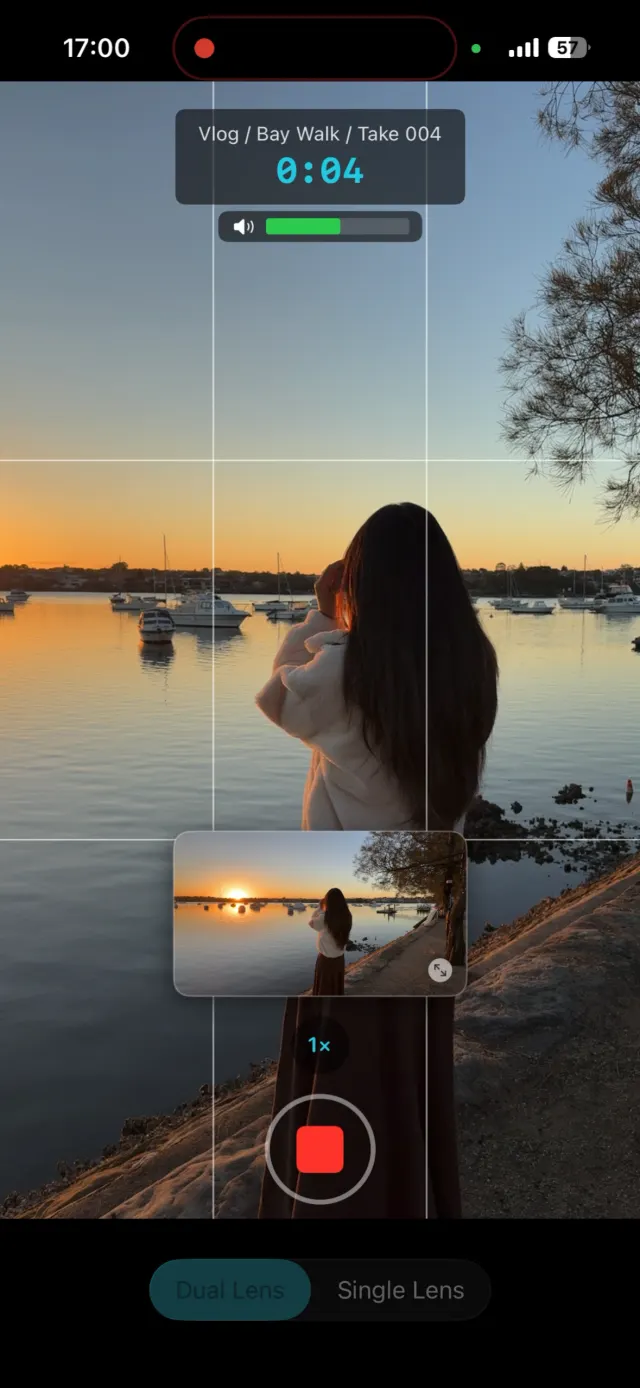
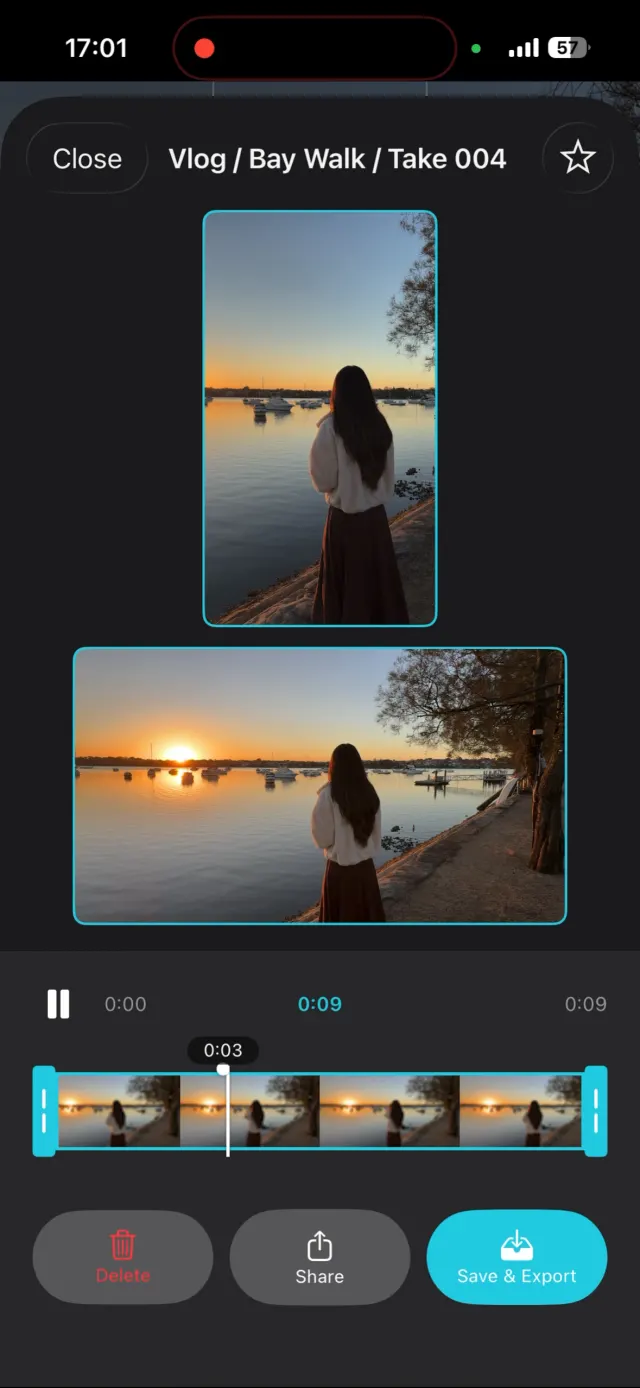
ContentCam: both framings while you shoot, then a side-by-side review of the two files.
Where ContentCam is genuinely different
Not louder, different in ways you can check yourself:
- It's the only one on Android. Every other app here is iPhone-only. If you shoot on a Pixel, Samsung or anything Android, ContentCam is the option, not the preferred option.
- It covers both jobs. Front / Back mode gives you the dual-camera-effect reactions, and the same app does the one-take dual-format for cross-posting. You're not installing two apps.
- The landscape is a real wide shot. In single-lens mode it records the sensor's full 4:3 frame and cuts both formats from it, so the 16:9 keeps its full width instead of being a zoomed strip of the vertical. Here's why that matters.
- No watermark, ever, and no data collection. No account, no analytics, no SDKs. It works offline.
So which should you install?
| If you mainly want… | Pick |
|---|---|
| Your face + your POV for reactions/vlogs, on iOS | MixCam or Dualgram |
| Separate vertical + wide files to cross-post, on any phone | ContentCam |
| Both of the above from one app | ContentCam |
| Android, full stop | ContentCam (the only option) |
| No watermark and zero data collection | ContentCam |
Common questions
Is there a free way to record front and back at the same time? Yes. TikTok, Snapchat and Instagram all have it built into the app, and the iPhone 17 Camera app has Dual Capture, up to 4K Dolby Vision at 30fps. A separate app is worth it when you need the footage as usable files rather than a finished post.
Do I need an iPhone 17? No. Third-party apps have recorded front and back together since iOS 13. Dual Capture in Apple's own Camera app is what the iPhone 17 added.
What is the difference between a dual-camera app and a dual-format app? A dual-camera app records two lenses at once, giving you two angles. A dual-format app records one scene in two aspect ratios, giving you a vertical and a widescreen version of the same take. They solve different problems and are covered separately above.
Which of these run on Android? Most of the front-and-back apps in this category are iPhone only. ContentCam runs on both.
Will the free versions let me move the small frame afterwards? No. The in-app effects record one file with the layout baked in.
Try ContentCam free, front and back in one take, and vertical and wide from a single shoot. No watermark, on iPhone and Android.


App details are from each app's App Store listing, checked 21 August 2026; features and prices change. Related: DualShot Recorder vs ContentCam, head to head and the full dual-format category compared, and DoubleTake vs ContentCam. Also: iPhone 17 Dual Capture, and where it stops.