Blackmagic Camera vs ContentCam: An Honest Comparison (2026)
Disclosure first: I build ContentCam, one of the two apps here, so I'm not neutral. Read it with that in mind. The claims about the Blackmagic Camera app come from Blackmagic Design's own product page, checked 29 August 2026, and where I give an opinion it's flagged as mine. If anything's out of date, email me and I'll fix it.
The Blackmagic Camera app is made by Blackmagic Design, the company behind DaVinci Resolve and the URSA and Pocket Cinema cameras. It's free, it's on iPhone and Android, and it turns your phone into a proper cinema camera: log capture, ProRes, manual controls that a DP would recognise, and a straight line into a DaVinci Resolve grade. It's a seriously impressive piece of software, and it's free, which is close to unfair.
So this isn't a takedown. Blackmagic Camera and ContentCam mostly don't compete. They're built for two different jobs, and the fastest way to pick is to work out which job you're doing. Here's the honest version.
At a glance
| ContentCam | Blackmagic Camera | |
|---|---|---|
| Platforms | iPhone + Android | iPhone + Android |
| Records 9:16 + 16:9 in one take | ✓ | One ratio per take |
| Two cameras at once (Dual Lens / Front+Back) | ✓ | Single camera |
| Log capture for grading | Not yet | ✓ |
| Pro codecs | HEVC (H.265), up to 4K | Apple ProRes, H.264 / H.265, up to 8K |
| Grade in DaVinci Resolve | Export and import like any file | ✓ Live sync via Blackmagic Cloud |
| Manual controls | Exposure, white balance (2500–8000K), ISO, shutter | Frame rate, shutter angle, white balance, ISO, focus peaking |
| Teleprompter | ✓ | No |
| Project / scene / take workflow | ✓, auto file naming | Cloud project-based |
| Cost | Free to try | Free |
| Built for | Creators cross-posting to both formats | Filmmakers chasing max image quality |
The real difference: one format at maximum quality vs both formats in one take
This is the whole thing, so I'll be blunt about it.
Blackmagic Camera is built to make one format look as good as a phone can make it. You pick your ratio before you roll, then you get cinema-grade tools to nail that shot: shutter angle instead of a vague brightness slider, a log color space that holds highlight and shadow detail for the grade, ProRes so you're not editing a compressed mush, and a handoff to DaVinci Resolve that a lot of desktop workflows would envy. If your output is a single polished video and image quality is the point, that's a serious kit for zero dollars.
ContentCam is built to get both formats out of the same moment. One take gives you a true 9:16 vertical file and a true 16:9 horizontal file, each keeping its own full framing, so the landscape isn't a cropped strip of the vertical. On iPhone 11 and later there's Dual Lens (wide and ultra-wide recording at once) and Front+Back (your face and what you're filming together). Blackmagic Camera does none of that, because it isn't trying to. It's a single-camera, single-format tool by design.
So the question isn't which app is better. It's which sentence describes you: "I need this one shot to look incredible," or "I need this one moment in two shapes so I can post it everywhere." The first is Blackmagic. The second is ContentCam.
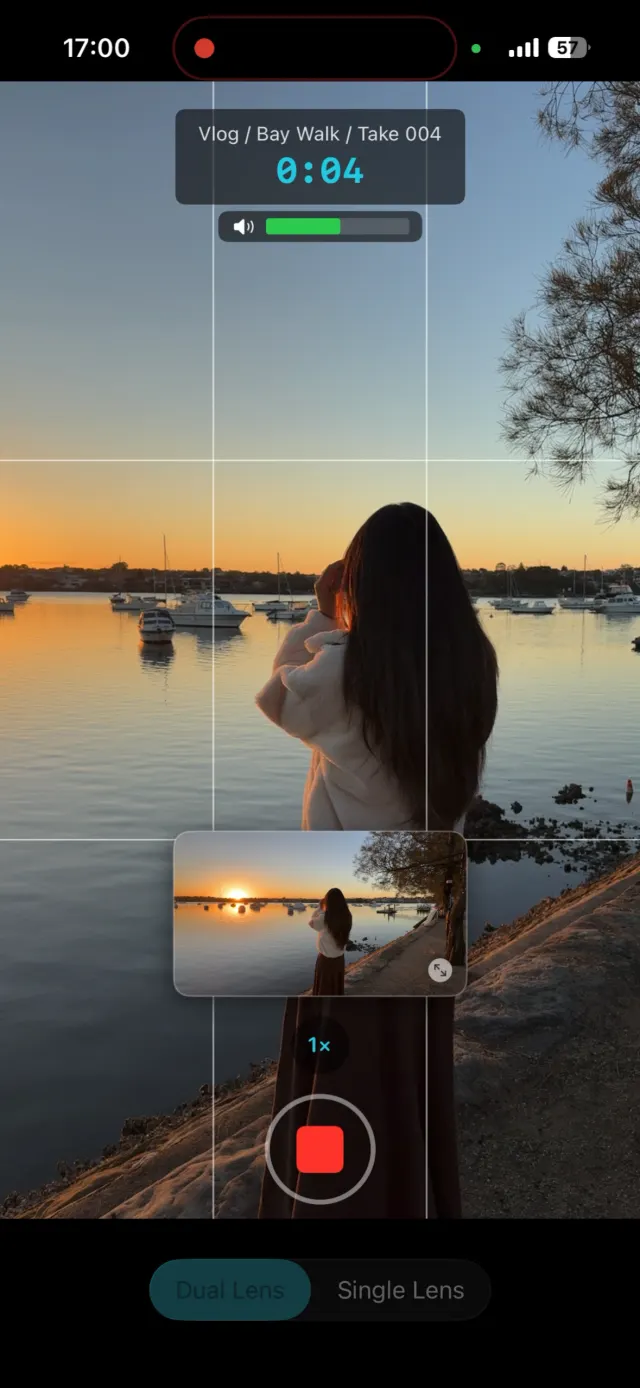
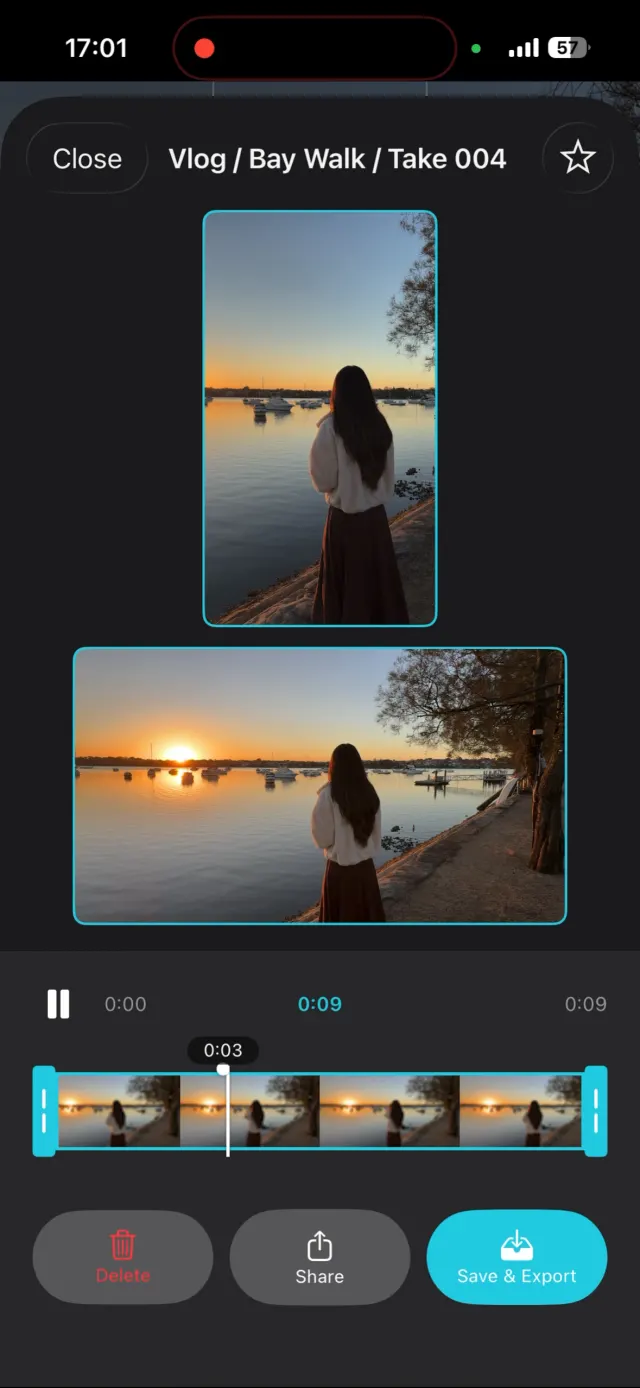
ContentCam's record and review screens: both framings while you shoot, then a side-by-side review of each file.
Where Blackmagic Camera genuinely wins
No hedging. If image quality on a single deliverable is your priority, Blackmagic Camera beats ContentCam today, and it isn't close:
- Log capture. It shoots in a log color space that preserves dynamic range for grading. ContentCam doesn't do log yet. For anyone who colours their footage, that alone can decide it.
- ProRes on iPhone, up to 8K on Android. On iPhone the ceiling is 10-bit Apple ProRes at 4K; the 8K mode is Android-only. Either way, editing-friendly codecs and, on Android, more resolution headroom than ContentCam's 4K. If you're mastering for a client or a big screen, that headroom matters.
- The DaVinci Resolve pipeline. Record, upload to Blackmagic Cloud, and an editor can be cutting in Resolve while you're still shooting. Nothing on the creator side of this comparison touches that.
- Cinematography controls. Shutter angle, focus peaking, custom LUTs for monitoring. These are filmmaker tools, and they're properly done.
If you're making a short film, a music video, a branded piece where the look is the product, download Blackmagic Camera and don't overthink it. That's the right tool.
Where ContentCam fits instead
ContentCam is for the creator who films the same moment and then has to post it to TikTok, Reels, Shorts and the main YouTube feed. Those platforms want opposite shapes, and the usual fixes are both bad: film it twice and the takes never match, or crop one into the other and upscale a soft, badly-framed second version. (I broke down why cropping looks worse in how to record portrait and landscape at the same time.)
ContentCam removes the choice. You shoot once and walk away with a full-quality vertical and a full-quality horizontal, framed properly, no re-filming and no cropping. Add the teleprompter, the manual panel, the project/scene/take workflow, Android support, and zero data collection, and it's built to be the everyday tool for someone shipping content on a schedule. Different job, different app.
Plenty of creators want both
These two aren't mutually exclusive, and I'd tell you to keep both on your phone. Use Blackmagic Camera for the hero shot, the piece where the grade earns its keep. Use ContentCam for the daily volume, the talking-head, the vlog, the launch clip that has to live on four platforms by tonight. One is your cinema camera. The other is your cross-posting machine. Neither one makes the other pointless.
So which should you download?
Both are free, so the low-risk move is to grab both and see. But if you want the shortcut:
| If you… | Pick |
|---|---|
| Grade your footage in DaVinci Resolve | Blackmagic Camera |
| Need log, ProRes, or resolution above 4K | Blackmagic Camera |
| Are making one polished, single-format video | Blackmagic Camera |
| Cross-post the same moment to vertical and horizontal | ContentCam |
| Want two cameras or two framings from one tap | ContentCam |
| Want a teleprompter while you record | ContentCam |
| Shoot on Android, or across iPhone + Android | Either (both support Android) |
| Ship content daily and hate re-filming | ContentCam |
The bottom line
Blackmagic Camera is the better tool for making one format look its absolute best, and it's free, which is remarkable. ContentCam is the better tool for getting both formats, or both cameras, out of a single take so you can post everywhere without re-shooting. If your work is grading a hero shot, go Blackmagic. If your work is feeding TikTok, Shorts and YouTube from the same moment, that's what ContentCam is for. Most working creators do a bit of both, which is why both belong on the phone.
Try ContentCam free. Record one take, get a real vertical and a real horizontal file, and see the workflow before you commit to anything. On iPhone and Android.


Blackmagic Camera details are from Blackmagic Design's product page, checked 29 August 2026; features drift over time. Related: DualShot Recorder vs ContentCam · the full dual-format category compared · vertical vs horizontal video · Blackmagic Camera settings explained · Blackmagic Camera vs Filmic Pro