Vertical vs Horizontal Video: Which Should You Shoot in 2026?
It's the question every creator hits before they press record: hold the phone upright for a tall 9:16 video, or turn it sideways for a wide 16:9 one? Get it wrong and you're re-filming, or cropping a clip into a shape it was never framed for.
The honest answer is that neither format is "better." Each one wins on a specific platform, and the right choice is whichever matches where the video will actually play. Here's how to decide, and what to do when the answer is "both."
What each platform actually wants
Platforms are opinionated about aspect ratio because they're opinionated about how you hold your device. The short version:
| Platform | Wants |
|---|---|
| TikTok | 9:16 vertical (full screen) |
| Instagram Reels | 9:16 vertical |
| YouTube Shorts | 9:16 vertical |
| Instagram feed | 4:5 vertical or 1:1 square |
| YouTube (main) | 16:9 horizontal |
| Desktop / TV / embeds | 16:9 horizontal |
| X / Twitter, LinkedIn, Facebook | either, but square or vertical stops the scroll |
Notice the split: the fast, mobile, full-screen feeds are vertical, and the lean-back, searchable, evergreen home (YouTube's main feed) is horizontal. That's the tension at the heart of the whole debate.
When vertical (9:16) wins
Vertical is the native language of the phone. It fills the entire screen, matches how people already hold the device, and demands no rotating or pinching. In a swipe-first feed, that full-screen real estate is the difference between a thumb-stop and a scroll-past.
Shoot vertical when:
- The video is destined for TikTok, Reels or Shorts, full stop.
- There's one main subject: a face, a product, a single point of focus. Vertical frames a person beautifully.
- You want maximum immersion and minimum friction in a mobile feed.
The trade-off is width. Vertical simply can't show a wide scene: a landscape, a room, two people side by side. You're seeing a phone-shaped slice of the world.
When horizontal (16:9) wins
Horizontal is how we've watched everything from cinema to TV, and it's still how the main YouTube feed, desktop players and living-room screens display video. It also matches how our eyes are set in our heads: side by side, built for a wide field of view.
Shoot horizontal when:
- The video lives on the main YouTube feed, a website, or anywhere people watch on a laptop or TV.
- The scene is wide: travel, landscapes, interiors, b-roll, anything where the background is the point.
- There are multiple subjects, or you're doing tutorials, gameplay, or interviews where you need room in the frame.
- You want a searchable, evergreen library. YouTube content keeps getting found for years; a horizontal master is worth having.
The trade-off is the mobile feed. Post a raw 16:9 clip to TikTok and it sits in a small letterboxed strip with black bars top and bottom, dead space where a full-screen video should be.
The catch: most creators need both
Here's where the "vertical vs horizontal" framing quietly breaks down. If you only ever posted to one platform, you'd just shoot its native ratio and never think about it again. But almost nobody does that anymore. You post the Reel and the YouTube video. The Short and the long-form. The same moment, in two incompatible shapes.
So the real question isn't "which should I shoot." It's "how do I get both without filming the moment twice or butchering one version in an editor." Because the usual fixes are bad:
- Film it twice: doubles your shoot time, and the two takes never quite match.
- Crop one into the other: you upscale a slice of pixels into a soft, badly-framed second version. (We broke down exactly why that looks bad in how to record portrait and landscape at the same time.)
How to stop choosing: capture both at once
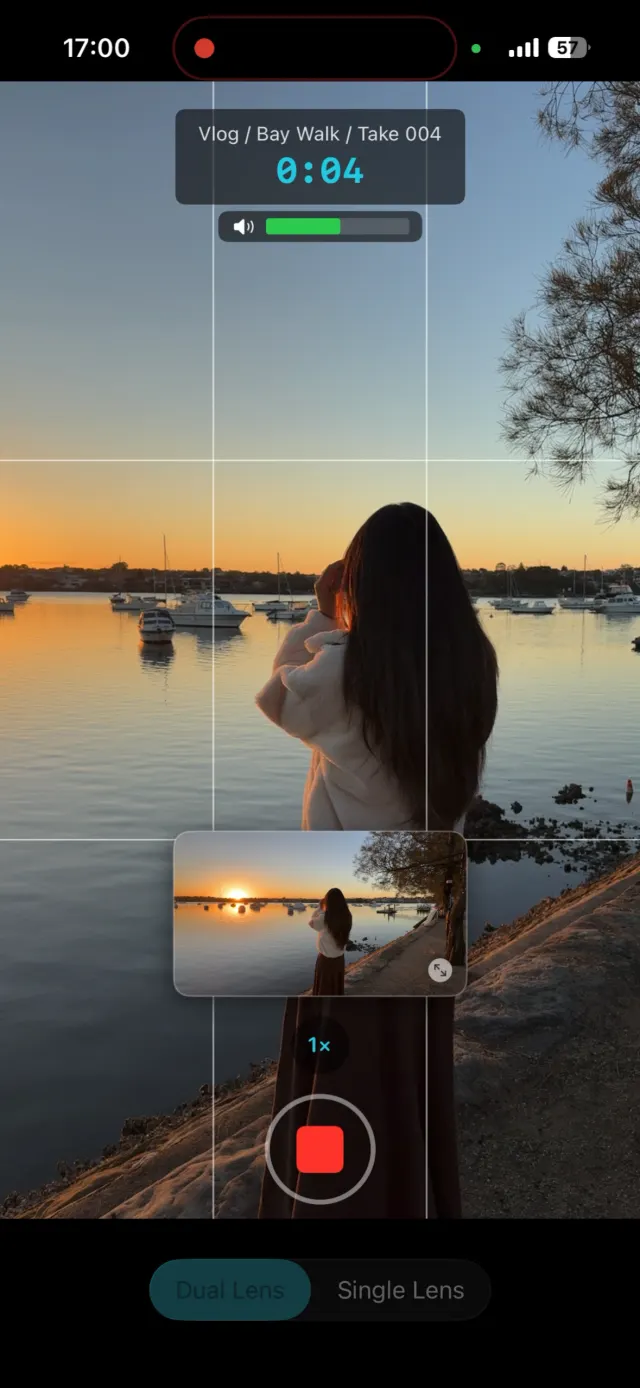
Your phone's camera sensor isn't vertical or horizontal. It's 4:3, wider than a 9:16 frame and taller than a 16:9 one. A standard camera app throws away part of that sensor the instant you pick an orientation. The smarter move is to keep the whole sensor and cut both deliverables from it at the moment you record.
That's what ContentCam does. I build the app, so treat that as a disclosure, but the idea holds whatever tool you use: one take gives you a true 9:16 vertical file that keeps the full vertical view, and a true 16:9 horizontal file that keeps the full horizontal view. Neither is a crop of the other, and both export at full quality (up to 4K). The "which do I shoot" decision just disappears: you shoot once and walk away with both.
A quick decision guide
| Your situation | Shoot |
|---|---|
| Only posting to TikTok / Reels / Shorts | Vertical 9:16 |
| Only posting to the main YouTube feed / desktop | Horizontal 16:9 |
| Posting to both vertical and horizontal platforms | Both, from one take |
| Not sure yet where it'll go | Both, to future-proof the footage |
| Wide scene you'll also want as a Short | Both, so the wide shot survives |
The bottom line
Vertical for the phone feeds, horizontal for YouTube and the big screens. If you genuinely only post to one, shoot its ratio and stop worrying. But if you cross-post like most creators do, the winning move in 2026 is capturing both in a single take, so you're never re-shooting or cropping again.
Stop choosing between vertical and horizontal. ContentCam records both from one take, free on both stores. Shoot once and look at both files before you decide anything.


Related: How to record portrait and landscape at the same time · The same on Android · How to film for TikTok and YouTube at the same time · Dual-format recording apps compared · How to record landscape video on iPhone · Why cropping vertical to horizontal looks wrong