How to Film UGC in Vertical and Horizontal From One Take
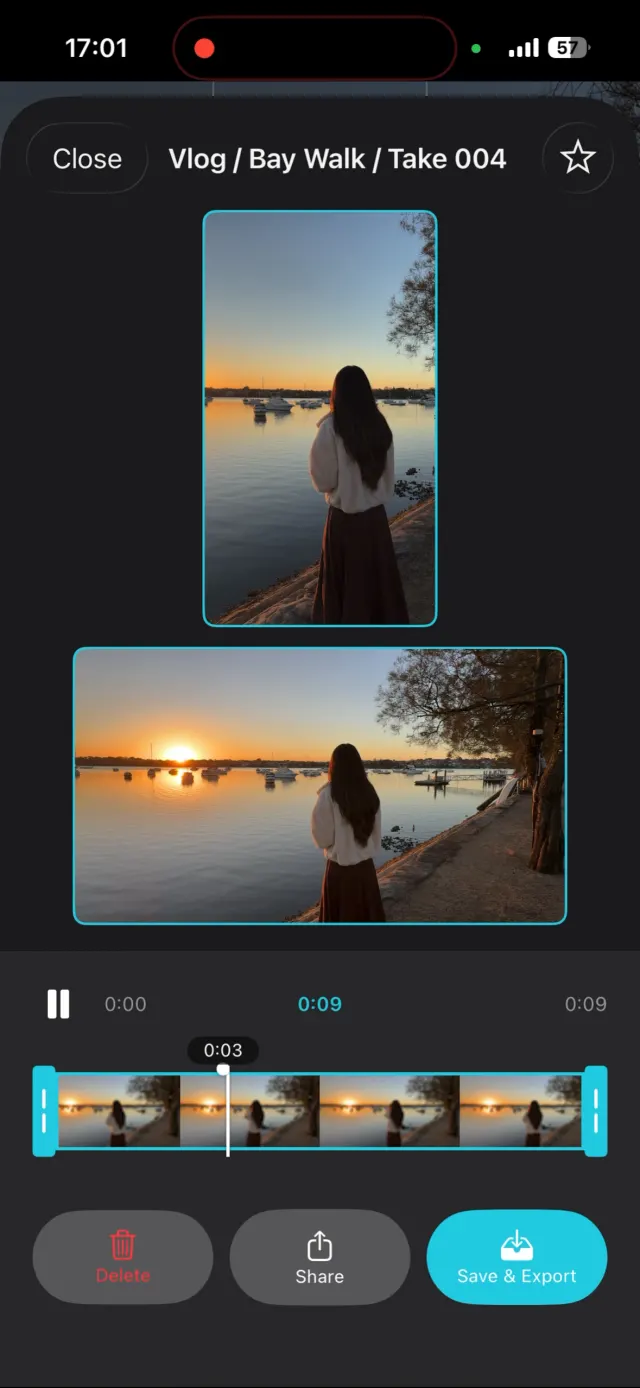
To film UGC in vertical and horizontal from one take, record 9:16 and 16:9 at the same time instead of cropping one from the other, and frame the product, your face and your hands in the middle of the shot. From the vertical file you can then cut 4:5 and 1:1 without losing anything important. Cropping a 1080×1920 vertical down to 16:9 leaves a 1080×608 strip, about 32% of the frame, which is why a horizontal cut from a vertical take always looks tight and soft.
Which aspect ratios does UGC need?
Four shapes cover nearly every placement a brand can run a UGC video in. At 1080 pixels on the short side:
- 9:16, 1080×1920: TikTok, Instagram Reels and Stories, YouTube Shorts.
- 4:5, 1080×1350: feed placements on Instagram and Facebook.
- 1:1, 1080×1080: square feed placements.
- 16:9, 1920×1080: YouTube, product pages, websites and TV-style placements.
Check the brief before you film. If it only asks for 9:16, you may never need the rest, but a brand that likes the video will often come back and ask for another shape. Having a real 16:9 file at that point beats re-shooting.
How much of the frame does each crop keep?
The answer depends on which file you crop from. Starting from a 9:16 vertical file (1080×1920) and from a 16:9 horizontal file (1920×1080):
| Target | From the 9:16 file | From the 16:9 file |
|---|---|---|
| 9:16 | 100% | 32% of the width |
| 4:5 | 70% of the height | 45% of the width |
| 1:1 | 56% of the height | 56% of the width |
| 16:9 | 32% of the height | 100% |
The pattern is clear. Cut 9:16, 4:5 and 1:1 from the vertical file, and use a real horizontal file for 16:9. The two corner cases, 16:9 from a vertical and 9:16 from a horizontal, both throw away about two thirds of the picture. The 16:9 strip from a vertical has to be enlarged about 3.2 times in area to fill a 1920×1080 timeline, which is where the softness comes from. Why cropping vertical to horizontal looks wrong goes through it in detail.
How do you frame one UGC take for every ratio?
Keep everything that matters in the middle of the vertical frame. A 1:1 crop keeps only the middle 1080 of 1920 rows, so the top 420 and bottom 420 pixels are at risk. In practice:
- Product at chest height, held near the centre of the frame, not low at the bottom edge.
- Eyes about a third of the way down the vertical frame, not right at the top, so a 1:1 or 4:5 crop doesn't cut through your forehead.
- Hands in the middle band for unboxings and demos. Hands at the bottom edge disappear in the square cut.
- No text on screen. Brands add their own captions and offers per placement, and burned-in text gets cut differently in every ratio.
- Room either side for the horizontal version. In a real 16:9 file you should see the space around you, so tidy the background past where your vertical frame ends.
How do you record vertical and horizontal at the same time?
The iPhone Camera app records one shape at a time, decided by how you hold the phone. To get both from one take you need an app that records both. ContentCam does this in two ways:
- Single Lens: one camera, two files. A 1080×1920 vertical and a 1920×1080 horizontal, encoded separately. The horizontal file shows more of the scene left and right than the vertical one, because neither is a crop of the other.
- Dual Lens: on iPhone 11 and later, the wide camera records the vertical and the ultra-wide records the horizontal, so you get a close shot and a wide shot of the same moment.
For scripted UGC, the built-in teleprompter scrolls your script on the recording screen while both files record, so the read and the framing happen in one pass. If your script still sounds written, start with how to write a UGC script that doesn't sound scripted.
How should you hand UGC files to a brand?
As separate, clearly named files, one per ratio, plus the raw takes if the contract includes them. A brand's editor should be able to tell what a file is without opening it. ContentCam names each recording after the project, scene and take number, with the shape at the end, for example skincare_hook_003_Portrait.mov and skincare_hook_003_Landscape.mov, so the pair stays together when you upload a folder.
Send the files through a link that keeps the originals, such as a shared cloud folder, rather than through a chat app that may compress them.
FAQ
What aspect ratio should UGC be?
Ask the brand, then film so you can deliver all four common shapes: 9:16 (1080×1920) for TikTok, Reels and Stories, 4:5 (1080×1350) and 1:1 (1080×1080) for feed placements, and 16:9 (1920×1080) for YouTube and websites.
Can I crop a vertical UGC video to 16:9?
You can, but the 16:9 strip is only 1080×608 pixels, about 32% of the vertical frame, and it has to be enlarged about 3.2 times in area to fill a 1920×1080 timeline. It looks soft and tight. Record a real horizontal version instead.
How do I film UGC for 4:5 and 1:1 as well?
Shoot vertical and keep the product, your face and your hands in the middle of the frame. A 4:5 crop keeps the middle 70% of a 9:16 frame's height and a 1:1 crop keeps the middle 56%, so anything near the top or bottom edge gets cut.
What app records vertical and horizontal video at the same time?
ContentCam records a 9:16 file and a 16:9 file from one take on iPhone and Android. The iPhone Camera app records one shape at a time, set by how you hold the phone.
Try ContentCam free. Records 9:16 and 16:9 at the same time, with a built-in teleprompter. Free to download on iPhone and Android.


Related: how to write a UGC script that doesn't sound scripted · why cropping vertical to horizontal looks wrong · how to record portrait and landscape at the same time on iPhone · filming a talking head at home.